
Panasonic AK-UCX100 Firmware Update: Faster Focus, Cleaner Control, Smarter IP Workflows
Firmware Update • Panasonic Studio Camera Systems
Panasonic AK-UCX100 Firmware Update: Faster Focus, Cleaner Control, Smarter IP Workflows
Panasonic’s latest firmware update for the AK-UCX100 4K HDR Studio Camera introduces powerful improvements to autofocus, scan performance, remote operations, IP trunk handling, and reliability—helping live production teams work faster and deliver cleaner results with fewer compromises.
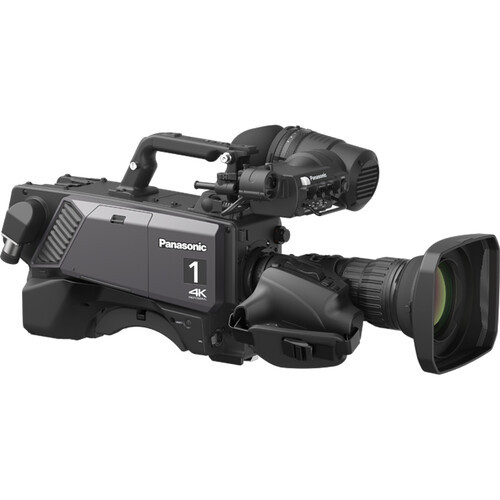
Looking to build or expand a premium 4K HDR studio camera chain? The AK-UCX100 is engineered for broadcast-grade performance with 12G-SDI and advanced IP workflows.
View Panasonic AK-UCX100
What’s New in This Firmware Update (Quick Highlights)
Key additions include:
• Phase Detection Autofocus (PDAF) for studio workflows
• Skew reduction scan mode menu option
• Remote Back Focus (RBF) support via ROP (AK-HRP1010/AK-HRP1015)
• EBU preset matrix option for more consistent color alignment
• F-drop & vignetting compensation (FVC) with lens correction data
• UHD TRUNK input support (ST2110 / JPEG XS)
• Event log enhancements + easier download/export options
• USB-C Power Delivery support (up to 27W)
• Jumbo Frame (MTU=9000) support for LAN TRUNK communication
• Stability fixes for ABB, redundancy environments, networking, and UHD streaming
• Skew reduction scan mode menu option
• Remote Back Focus (RBF) support via ROP (AK-HRP1010/AK-HRP1015)
• EBU preset matrix option for more consistent color alignment
• F-drop & vignetting compensation (FVC) with lens correction data
• UHD TRUNK input support (ST2110 / JPEG XS)
• Event log enhancements + easier download/export options
• USB-C Power Delivery support (up to 27W)
• Jumbo Frame (MTU=9000) support for LAN TRUNK communication
• Stability fixes for ABB, redundancy environments, networking, and UHD streaming
Where to Download the AK-UCX100 Firmware Update
You can download the official Panasonic AK-UCX100 firmware update directly from Panasonic’s support portal.
Download Firmware from Panasonic
Best practice: Review release notes, confirm camera settings and system compatibility, and schedule updates during a maintenance window—especially for multi-camera productions.
1) Studio-Ready Autofocus with Phase Detection (PDAF)
This update adds Phase Detection Autofocus (PDAF), enabling autofocus performance even in a studio system camera environment—especially helpful for fast-paced productions where operators need reliable subject acquisition without slowing down the shot.
Related Menu
FOCUS SETTING > FOCUS MODE: MANUAL/AUTO
AF SPEED: [1] - [10]
AF AREA SIZE: [SMALL][MID][LARGE]
AF AREA POSITION: [U.LEFT], [U.CENTER], [U.RIGHT], [LEFT], [CENTER], [RIGHT], [B.LEFT], [B.CENTER], [B.RIGHT]
AF SPEED: [1] - [10]
AF AREA SIZE: [SMALL][MID][LARGE]
AF AREA POSITION: [U.LEFT], [U.CENTER], [U.RIGHT], [LEFT], [CENTER], [RIGHT], [B.LEFT], [B.CENTER], [B.RIGHT]
2) Added Scan Mode Menu for Skew Reduction
A new menu option introduces a Low Skew scan mode, supporting cleaner motion capture in situations where skew artifacts can become visible—especially during fast pans, dynamic motion, and rapid camera repositioning.
Related Menu
BASIC CONFIG > SCAN MODE: NORMAL/LOW SKEW
3) Remote Back Focus (RBF) from the ROP
Back focus adjustment can now be performed remotely from the ROP—ideal for teams managing multiple cameras and lenses where precision and speed matter.
As of December 2025: Compatible ROP models include AK-HRP1010 and AK-HRP1015.
4) New EBU Preset Matrix Option
For consistent color matching, the preset matrix options now include EBU mode—a matrix setting based on EBU-NORMAL for AK-UC4000. This is especially helpful when your workflows depend on predictable baseline color alignment across camera systems.
Related Menu
PAINT > LINEAR MATRIX > PRESET MATRIX: HD/NORMAL/STD1/STD2/CINEMA1/CINEMA2/EBU/USER
COLOR CORRECTION > PRESET MATRIX: HD/NORMAL/STD1/STD2/CINEMA1/CINEMA2/EBU/USER
COLOR CORRECTION > PRESET MATRIX: HD/NORMAL/STD1/STD2/CINEMA1/CINEMA2/EBU/USER
5) F-drop & Vignetting Compensation (FVC)
When connecting a lens for the first time, the system can obtain correction data and automatically compensate for F-drop and vignetting based on lens position—supporting more consistent brightness and uniformity across zoom and iris changes.
Related Menu
MAINTENANCE > FVC ADJUST
SUB DISPLAY > STATUS INDICATOR > FVC
SUB DISPLAY > MODE CHECK IND > FVC
SUB DISPLAY > STATUS INDICATOR > FVC
SUB DISPLAY > MODE CHECK IND > FVC
6) UHD TRUNK (ST2110 / JPEG XS) Input Support
This firmware update expands trunk capabilities with UHD TRUNK input support (ST2110 / JPEG XS), giving production teams more flexibility in IP-based UHD workflows.
Updated Menu
IP SIGNAL > ST2110 COMMON > TRUNK VIDEO TX > FORMAT
Previously: HD TRUNK (CCU_CONNECT / ST2110 / JPEG XS)
Updated: UHD TRUNK (ST2110 / JPEG XS), HD TRUNK (CCU_CONNECT)
Updated: UHD TRUNK (ST2110 / JPEG XS), HD TRUNK (CCU_CONNECT)
7) Event Log Improvements + VF Dark Gain Status Display
Event and error logs can now be output to files and downloaded to USB media from the OSD menu—or downloaded to a PC via the web interface. The OSD also displays VF Dark Gain status when enabled, improving visibility confirmation during challenging lighting scenarios.
Related Menu
SUB DISPLAY > STATUS INDICATOR > VF DARK GAIN: OFF, ON
VF Dark Gain: Enhances dark areas of the VF image to improve viewfinder visibility when subjects are underexposed or difficult to see.
8) CAM NUMBER Support (1–99)
Multi-camera environments benefit from improved identification: the AK-UCX100 now supports camera numbering from 1–99 via OSD or Web UI.
Related Menu
[OSD] BASIC CONFIG > CAMERA NUMBER 1-99
[WEB] Setup > System > Basic Config > CAMERA NUMBER 1-99
[WEB] Setup > System > Basic Config > CAMERA NUMBER 1-99
9) USB-C Power Delivery + Jumbo Frame Support
The USB-C connector now supports Power Delivery (up to 27W), offering more flexibility for modern accessories and service workflows. Additionally, LAN TRUNK communication now supports Jumbo Frame (MTU=9000), helping improve throughput efficiency in compatible network environments.
Related Menu
MAINTENANCE > DC OUT MODE: DC OUT/USB, USB PD
Why Jumbo Frames matter: When properly configured end-to-end, larger frames can reduce overhead and improve efficiency for certain network data paths—especially useful for IP-based production ecosystems.
10) Reliability Fixes Included in This Update
The following issues have been addressed to improve stability across studio and IP workflows:
• ABB may fail with 24P/30P/25P.
• In ST2110 redundancy environments, unstable SFP PRI connections may cause SFP SEC video to freeze.
• LAN communication may be disabled when a specific subnet mask is set while DHCP is enabled.
• Block noise may appear in main/streaming output when streaming UHD content.
• In ST2110 redundancy environments, unstable SFP PRI connections may cause SFP SEC video to freeze.
• LAN communication may be disabled when a specific subnet mask is set while DHCP is enabled.
• Block noise may appear in main/streaming output when streaming UHD content.
Ready to Upgrade Your Studio Camera Chain?
The Panasonic AK-UCX100 is built for broadcast-grade 4K HDR production with advanced control and IP workflow support—now with firmware enhancements that improve focus performance, color handling, remote lens management, and network reliability.
Explore the AK-UCX100 Download the Firmware
Need help with configuration, compatibility, or system design? Omega Broadcast can help you spec a complete Panasonic workflow.
Jan 7th 2026
Recent Posts
-
Where LiveU is Headed: Beyond Broadcast, Into Everything
Where LiveU is Headed: Beyond Broadcast, Into Everything A look at LiveU’s evolving strategy, prod …Mar 30th 2026 -
New Firmware Update Available for Sony FX6
Attention FX6 Owners New Firmware Update Available Sony’s latest FX6 firmware brings a cleaner s …Mar 26th 2026 -
Panasonic 137" Full HD All-In-One Direct-View LED Display
Panasonic Professional Display Solutions Panasonic 137" Full HD All-In-One Direct-View LED Displa …Mar 25th 2026