
Panasonic’s New “Virtual RCP” for PCs & Tablets: Image Adjust Pro Plug-in
What Image Adjust Pro is (and what it replaces)
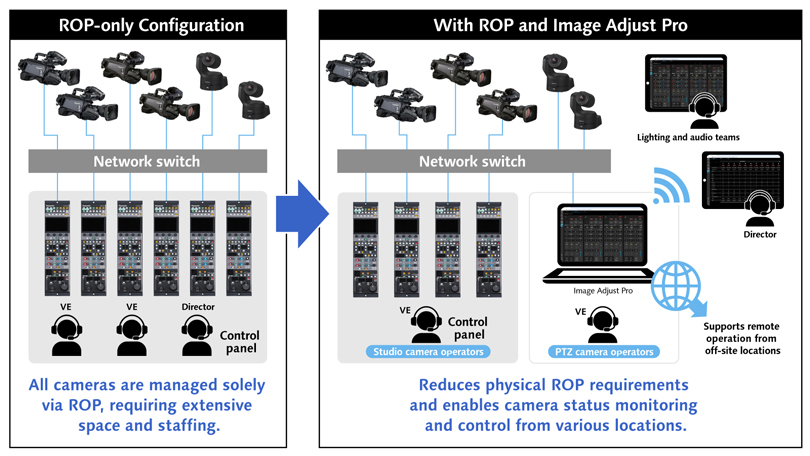
Image Adjust Pro is a plug-in for Panasonic’s Media Production Suite platform that enables operators to adjust image settings for multiple compatible Panasonic cameras using a PC or tablet—bringing ROP-style control into software. This is particularly valuable in environments where space is limited and production teams can’t justify multiple physical ROPs on a crowded desk.
Panasonic positions Image Adjust Pro as a way to streamline production workflows by reducing physical equipment needs while still supporting hybrid setups—where a hardware ROP can remain on your primary camera(s), and Image Adjust Pro can handle additional cameras without sacrificing operational precision.

Built for remote and multi-user operation (without the “ROP pile-up”)
Image Adjust Pro can be accessed from multiple devices on the same network (for example, laptops and tablets) while a Windows PC hosts the plug-in. That means directors can monitor camera status centrally, while lighting and technical staff can adjust settings directly from their stations—reducing physical constraints and enabling a more collaborative workflow.
Three GUI options (with a smart adoption curve)
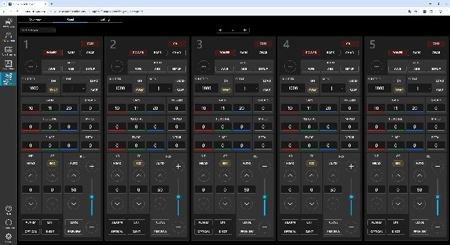
Panasonic describes three distinct control-panel GUI options: a hardware-style layout mirroring AK-HRP1010 button logic; a graphical layout reminiscent of video editing software; and a customizable UI that can surface only essential controls. Importantly, Panasonic notes that the graphical layout and custom UI are planned for future updates.
Initial camera compatibility (and what’s coming next)
Panasonic states that initial compatibility includes select studio cameras, PTZ models, and a multipurpose camera, with additional PTZ support planned in a future update.
- Studio: AK-UCX100, AK-UC4000/UC4000B, AK-UC3300
- PTZ: AW-UE160, AW-UE150A
- Multipurpose: AK-UBX100
- PTZ: AW-UE150
- PTZ: AW-UR100
Key features (practical, not theoretical)
- Software-based “Virtual RCP” control of compatible Panasonic studio and PTZ cameras from a PC or tablet.
- Status monitoring + control for up to 20 cameras per license—built for multi-camera venues and studios.
- Two core interfaces: List View for fast oversight, and Panel View for familiar ROP-style operation.
- Network-accessible from multiple devices (with a Windows PC as the host terminal), supporting decentralized teams.
- Hybrid-ready: keep a hardware ROP on your hero cameras while using Image Adjust Pro for secondary units to reduce hardware clutter without compromising image control.
See it at ISE 2026
Panasonic plans to showcase Media Production Suite and the Image Adjust Pro plug-in at Integrated Systems Europe (ISE) 2026 in Barcelona, February 3–6, at Booth 3J500.
Recent Posts
-
New Firmware Update Available for Sony FX6
Attention FX6 Owners New Firmware Update Available Sony’s latest FX6 firmware brings a cleaner s …Mar 26th 2026 -
Panasonic 137" Full HD All-In-One Direct-View LED Display
Panasonic Professional Display Solutions Panasonic 137" Full HD All-In-One Direct-View LED Displa …Mar 25th 2026 -
Panasonic PT-VMZ-AVCART Artome Mobile AV Cart for VMZ Series Projectors
Panasonic Presentation Solutions Panasonic PT-VMZ-AVCART Artome Mobile AV Cart for VMZ Series Proj …Mar 24th 2026