
Arcadia Release 4: IrisX Panel Integration
Arcadia Release 4: IrisX Panel Integration
Highlights and setup walkthrough based on Clear-Com’s latest update.
Get the Arcadia X4 48P for your facility
Shop at Omega Broadcast & Cinema Watch: Arcadia Release 4 | IrisX Panel Integration
Meet IrisX: Purpose-Built Flexibility
- Panel sizes: 12, 24, and 32 keys with lever, rotary, and push-button options.
- Color-coded UI: Quickly identify channels—party-lines, point-to-point, and IFBs—at a glance.
- IFB & Groups: Talk with talent (IFB) and communicate one-to-many with force-listen groups.
- Unlimited listen/talk combos: Talk and listen to as many channels as needed.
- Audio I/O: External audio in/out for added headsets or speakers.
- Expanded GPIO: Contact closures for external devices (e.g., two-way radios).
Connectivity with Arcadia: Prereqs & Firmware
- Verify firmware: Ensure the IrisX panel is on the latest firmware. (IrisX updates via USB; Arcadia and IrisX firmware are available via the Solution Finder.)
- Open Arcadia CCM: Log into the Configuration & Control Manager (CCM). Confirm Arcadia version in the bottom-left corner.
Tip: Keep Arcadia and IrisX on compatible releases to ensure panel discovery and endpoint properties display correctly.
Add an IrisX Panel in CCM
- In Resources → Add Resource, choose Key Panel.
- Assign Panel Name, select Port Type, and set Username (password optional).
- Remember: some properties belong to the port, others to the endpoint once connected.
Port-Level Settings (I.V. Ports)
- Network options and quality profiles.
- IP port is hardcoded to 6002 on Arcadia.
- Enable/disable/remove port; update credentials as needed.
Endpoint-Level Settings
- Optionally assign a fixed role and adjust display settings.
- Once connected, panel firmware version and role populate automatically (e.g., “Director”).
Roles, Presets & Colors
- Go to Configuration → Roles and click Add Role.
- Name the role and select your panel model (e.g., 12-key for the Dressing Room).
- Populate presets with Talk, Listen Only, Talk & Listen, etc.
- New: Assign a dedicated color to each key for faster visual parsing.
UI refinement: Role settings can now slide in/out for quicker navigation while you build out keys and logic.
Logic, GPIO & Channel Management
- Logic options: Configure GPIOs (contact closures) for integrations like two-way radios.
- Channels & Groups: Both tabs behave as you’d expect—now with the added benefit of colorized keys on IrisX.
Arcadia X4 48P: Where IrisX Fits
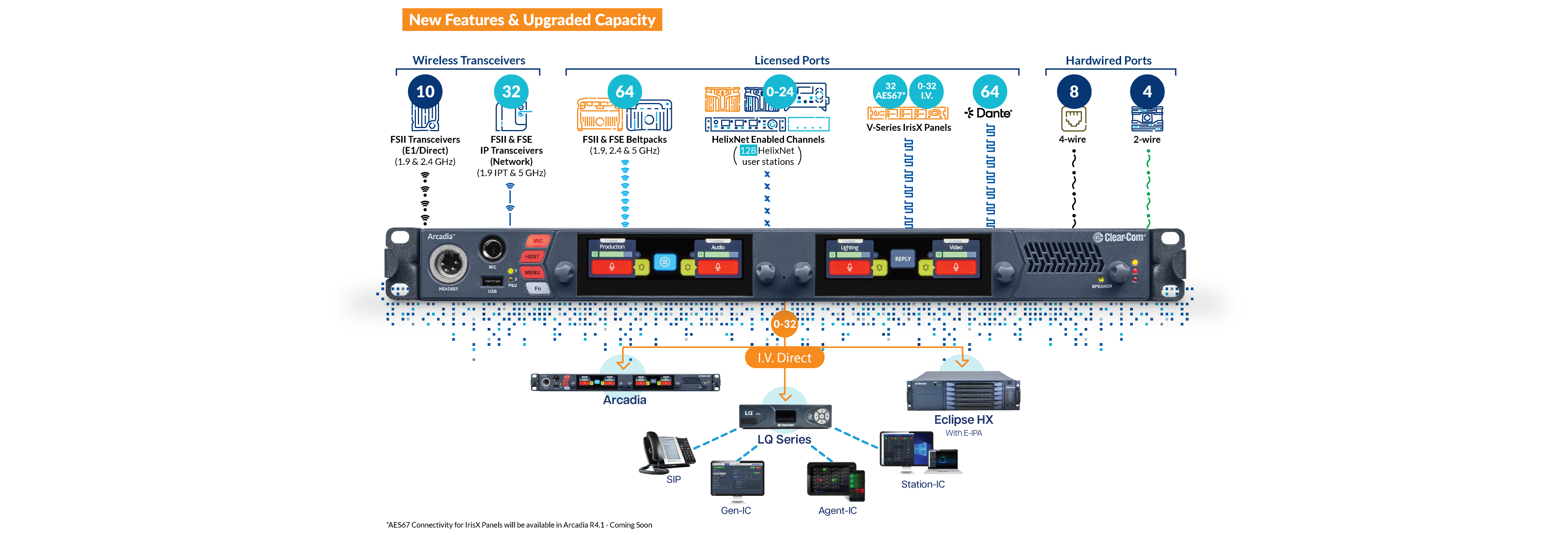
Pair your IrisX panels with the Arcadia X4 48P package for scalable wired/wireless comms and Dante audio integration.
- Capacity: up to 32 FreeSpeak II/Edge beltpacks, 16 IPT transceivers, and up to 10 E1 transceivers.
- Connectivity: 48 ports, up to 100 channels in a 1RU chassis.
- Audio: Dante-enabled; high-quality 12kHz audio to FreeSpeak Edge beltpacks.
- Operator UX: dual full-color TFT touchscreens and rotary encoders.
- I/O: 2-wire/4-wire with auto-null and PTP leader clock support.
- Headset: includes a 4-pin XLRF headset with the package.
Status & Health at a Glance
A Key Panels status table lets you select individual panels and view detailed status on the right—handy for verifying versions, roles, and connectivity across the system.
Why it matters
Arcadia R4/4.1 plus IrisX delivers faster setup, clearer at-a-glance operation, and tighter device integrations—ideal for productions that demand scale, flexibility, and bulletproof comms.
Have Questions or Need a Quote?
Our broadcast experts are ready to help you design and deploy the ideal Clear-Com system for your workflow.
Call us at (512) 251-7778 or email sales@omegabroadcast.com
Oct 27th 2025
Recent Posts
-
FOR-A Viztrick AiDi: AI-Powered Graphics & Analysis for Live Sports Production
AI-Powered Sports Production FOR-A Viztrick AiDi An AI-powered, tablet-operated system that visual …Oct 5th 2026 -
Panasonic Introduces the AW-UER200 Series of 5K PTZ Cameras
Panasonic Introduces the AW-UER200 Series of 5K PTZ Cameras Panasonic is expanding creative poss …Sep 25th 2026 -
Yamaha Expands Professional Audio with the DM5 Series and New RUio I/O Solutions
New from Yamaha Yamaha Expands Professional Audio with the DM5 Series and New RUio I/O Solutions F …Sep 23rd 2026